Object Classification
This tutorial describes how to use the cvtk package to build and train a model for an object classification task, covering the process from training to inference.
Note
The cvtk package internally uses functions from the torch (PyTorch) and torchvision packages for object classification. Make sure that PyTorch and torchvision are installed correctly before using cvtk.
import torch
import torchvision
print(f"torch {torch.__version__}")
print(f"torchvision {torchvision.__version__}")
Preparation
Users can write the source code for object classification from scratch
using a few functions provided by the cvtk package.
However, for those new to programming or deep learning,
it is recommended to first use the cvtk deploy-model command
to generate an example script and then modify it as needed.
cvtk deploy-model --script_name cls.py --backend torch --task cls
This command generates a simple source code file named cls.py
that contains only the essential processes,
with all complex functionality imported from the cvtk package.
This makes the source code easy to read
and helps beginners understand the flow of a deep learning workflow.
By default, the network architecture ResNet18 (torchvision.models.resnet18) is used.
Users can change resnet18 to other available architectures by editing cls.py.
A list of available architectures and pre-trained models can be found on the PyTorch website:
Models and pre-trained weights.
For users already familiar with deep learning,
it is recommended to run the command with the additional --vanilla argument.
This generates source code that uses only torch functions, without relying on cvtk.
This approach produces a script that can be shared with others who do not have cvtk installed,
or customized further,
for example, by adding data augmentation or changing optimization algorithms.
cvtk deploy-model --script_name cls.py --backend torch --task cls --vanilla
Model Training and Validation
The source code cls.py generated above
can be used to train an object classification model
by running it with the appropriate arguments.
For example, if the training, validation, and test data are listed
in train.txt, valid.txt, and test.txt respectively,
and the class labels are listed in label.txt,
the model can be trained using the following command.
python cls.py train \
    --label ./data/fruits/label.txt \
    --train ./data/fruits/train.txt \
    --valid ./data/fruits/valid.txt \
    --test ./data/fruits/test.txt \
    --output_weights ./outputs/fruits.pth
The trained model weights will be saved in fruits.pth.
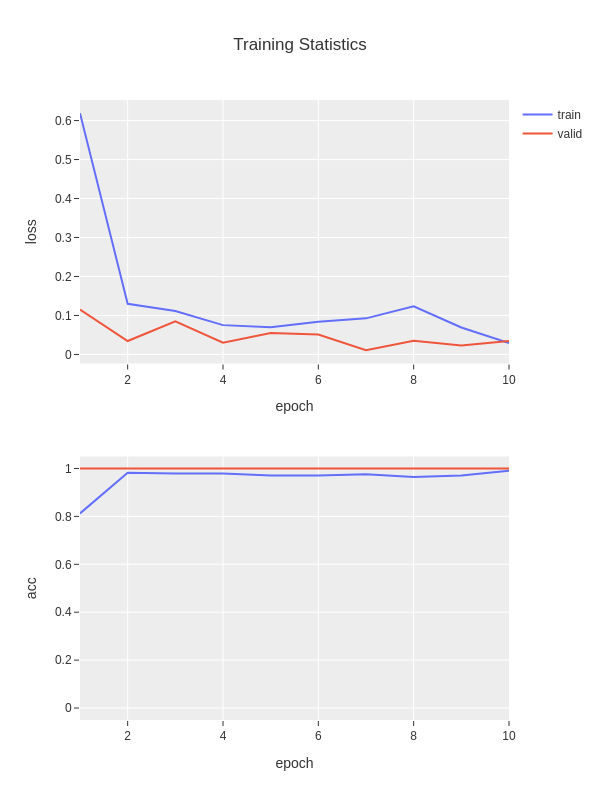
During training, the loss and accuracy metrics will be saved in fruits.train_stats.txt
and visualized in fruits.train_stats.png.
The file fruits.train_stats.txt is a tab-separated file with five columns:
epoch, train_loss, train_acc, valid_loss, and valid_acc.
epoch  train_loss  train_acc  valid_loss  valid_acc
1      1.40679     0.22368    1.24780     0.41667
2      1.21213     0.48684    1.09401     0.83334
3      1.00425     0.81578    0.88967     0.83334
4      0.78659     0.82894    0.64055     0.91666
5      0.46396     0.96052    0.39010     0.91666
In addition, the model will be evaluated on the test data when it is available.
Test results will be saved in fruits.test_outputs.txt,
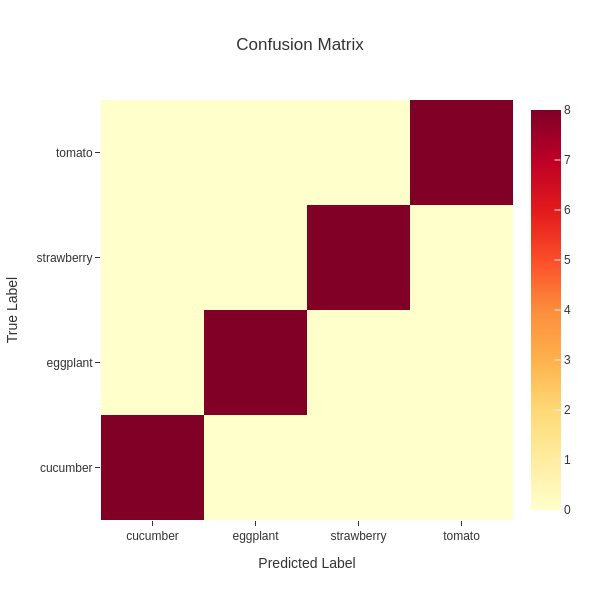
and the confusion matrix will be saved in fruits.test_outputs.cm.txt and fruits.test_outputs.cm.png.
The file fruits.test_outputs.txt is tab-separated,
with the first column as the image path,
the second column as the true label, and the following columns as predicted probabilities for each class.
# loss: 0.021113455295562744
# acc: 0.944932234
image         label       cucumber  eggplant  strawberry  tomato
44a0ceae.jpg  cucumber    0.97071   0.00400   0.01282     0.01248
4b0249f4.jpg  cucumber    0.81493   0.09675   0.04698     0.04134
14c6e557.jpg  strawberry  0.00000   0.00028   0.99940     0.00032
...
The file fruits.test_outputs.cm.txt represents a confusion matrix.
Columns correspond to predicted labels, and rows correspond to ground-truth labels.
# Confusion Matrix
#   prediction
    cucumber        eggplant        strawberry      tomato
cucumber    8       0       0       0
eggplant    0       8       0       0
strawberry  0       0       8       0
tomato      0       0       0       8
If validation or test data are not available, the model can still be trained using only the training data.
python cls.py train \
    --label ./data/fruits/label.txt \
    --train ./data/fruits/train.txt \
    --output_weights ./outputs/fruits.pth
In addition, this script also supports resuming training from the previously trained weights.
Specify the path to the pretrained weights using the --input_weights argument as follows.
python cls.py train \
    --label ./data/fruits/label.txt \
    --train ./data/fruits/train.txt \
    --valid ./data/fruits/valid.txt \
    --test ./data/fruits/test.txt \
    --input_weights ./outputs/fruits.pth \
    --output_weights ./outputs/fruits_v2.pth
Users can also customize various training parameters
such as the number of epochs, batch size, and optimization algorithm
by editing the default values in the train function inside cls.py.
Inference
Running cls.py with the inference argument
allows users to perform inference using a trained model.
For inference, the label file, input images, trained model weights,
and the output file path for storing the inference results must be specified.
The input images should be specified with the --data argument,
which can be either a text file containing image paths (one path per line)
or a directory containing images.
python cls.py inference \
    --label ./data/fruits/label.txt \
    --data ./data/fruits/test.txt \
    --model_weights ./outputs/fruits.pth \
    --output ./outputs/fruits.inference_results.txt
In this example, the inference results will be saved in fruits.inference_results.txt.
The file is tab-separated, with the first column as the image path,
the second column as the predicted label,
and the following columns as the predicted probabilities for each class.
image         prediction  cucumber  eggplant  strawberry  tomato
44a0ceae.jpg  cucumber    0.99384   0.00226   0.00081     0.00308
14c6e557.jpg  strawberry  0.00000   0.00003   0.99965     0.00032
c937b2d9.jpg  eggplant    0.00177   0.99704   0.00031     0.00088
1fd32b2f.jpg  eggplant    0.00001   0.99994   0.00003     0.00000
cad59952.jpg  tomato      0.00000   0.00000   0.00001     0.99999