Object Classification
This tutorial describes how to use the cvtk package to build a model of an object classification task, from training the to inference.
Note
The cvtk package internally calls functions implemented in the torch (PyTorch) and torchvision packages for object classification tasks. Ensure that PyTorch is installed correctly without any errors before using the cvtk package.
import torch
import torchvision
print(torch.__version__)
print(torchvision.__version__)
Source Code Preparation
User can import cvtk package to build and train a model
for object classification tasks and use the model for inference
by refering to the cvtk package documentation.
Alternatively, to get the quick start,
user can generate an example Python source code using the cvtk command.
The source code for object classification tasks
can be generated by cvtk create command with the --task cls argument.
For those new to programming or deep learning,
it is recommended to run the command with default options.
It generates simple source code that contains only the essential processes,
with all complex processes imported from the cvtk package.
This makes the source code easy to read and helps in
understanding the flow of deep learning for beginners.
cvtk create --script cls.py --task cls
After running the command, the source code will be generated in the file cls.py.
By default, the network architecture ResNet18 (torchvision.models.resnet18) is used.
User can change the resnet18 to other keywords to use different network architectures
by editing cls.py.
The available network architectures can be found on the PyTroch website
(e.g., Models and pre-trained weights).
Additionally, for those who are already familiar with deep learning,
it is recommended to run the command with the additional argument --vanilla.
It generates source code that uses only the PyTorch package functions.
Users can then customize the source code to suit their needs,
for example, adding data augmentation processes and changing optimization algorithms.
cvtk create --script cls.py --task cls --vanilla
Model Training and Validation
To train the model, open the source code generated above and execute it by providing training,
validation, and test data to the input of the train function.
Alternatively, the source code can be executed directly from the command line as follows:
python cls.py train \
    --label ./data/fruits/label.txt \
    --train ./data/fruits/train.txt \
    --valid ./data/fruits/valid.txt \
    --test ./data/fruits/test.txt \
    --output_weights ./outputs/fruits.pth
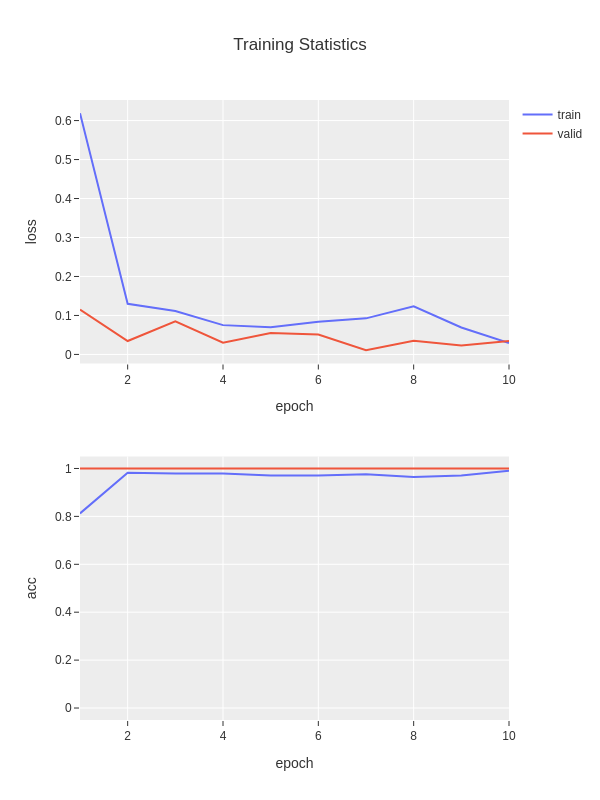
The weights of the trained model will be saved in fruits.pth,
and the loss and accuracy data during the training process will be saved in
fruits.train_stats.txt and showed in figure fruits.train_stats.png.
The file fruits.train_stats.txt is a tab-separated file
consiting of five columns: epoch, train_loss, train_acc, valid_loss, and vlaid_acc,
as follows:
epoch  train_loss  train_acc  valid_loss  valid_acc
1      1.40679     0.22368    1.24780     0.41667
2      1.21213     0.48684    1.09401     0.83334
3      1.00425     0.81578    0.88967     0.83334
4      0.78659     0.82894    0.64055     0.91666
5      0.46396     0.96052    0.39010     0.91666
Additionally, if the test data is provided,
the model will be evaluated using the test data.
The test results will be saved in fruits.test_outputs.txt
and confusion matrix will be saved in fruits.test_outputs.cm.txt
and fruits.test_outputs.cm.png.
The file fruits.test_outputs.txt is a tab-separated file,
where the first column is the path to the image,
the second column is the true label,
and the following columns are the predicted probabilities for each class.
# loss: 0.021113455295562744
# acc: 0.944932234
image         label       cucumber  eggplant  strawberry  tomato
44a0ceae.jpg  cucumber    0.97071   0.00400   0.01282     0.01248
4b0249f4.jpg  cucumber    0.81493   0.09675   0.04698     0.04134
14c6e557.jpg  strawberry  0.00000   0.00028   0.99940     0.00032
18174d63.jpg  strawberry  0.00000   0.00045   0.99904     0.00051
2a43e151.jpg  tomato      0.00004   0.00119   0.00404     0.99473
35235e30.jpg  eggplant    0.00000   1.00000   0.00000     0.00000
667a045f.jpg  cucumber    0.96733   0.00430   0.01193     0.01644
...
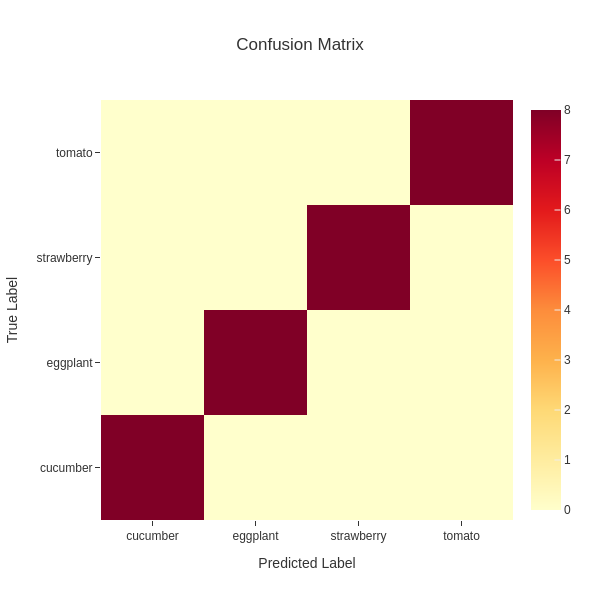
The file fruits.test_outputs.cm.txt is a tab-separated file,
representing a confusion matrix of test data.
The class labels shown in the header are the predicted labels
while the class labels shown in the first column are the ground truth.
# Confusion Matrix
#   prediction
    cucumber        eggplant        strawberry      tomato
cucumber    8       0       0       0
eggplant    0       8       0       0
strawberry  0       0       8       0
tomato      0       0       0       8
The file fruits.test_outputs.cm.png is a figure showing
the confusion matrix.
Inference
To perform inference using the constructed model,
refer to the inference function in the source code.
Alternatively, it can also be executed directly from the command line as follows:
python cls.py inference \
    --label ./data/fruits/label.txt \
    --data ./data/fruits/test.txt \
    --model_weights ./outputs/fruits.pth \
    --output ./outputs/fruits.inference_results.txt
The inference results will will be saved in fruits.inference_results.txt.
The file is a tab-separated file,
where the first column is the path to the image,
the second column is the predicted label,
and the following columns are the predicted probabilities for each class.
image         prediction  cucumber  eggplant  strawberry  tomato
44a0ceae.jpg  cucumber    0.99384   0.00226   0.00081     0.00308
14c6e557.jpg  strawberry  0.00000   0.00003   0.99965     0.00032
c937b2d9.jpg  eggplant    0.00177   0.99704   0.00031     0.00088
1fd32b2f.jpg  eggplant    0.00001   0.99994   0.00003     0.00000
cad59952.jpg  tomato      0.00000   0.00000   0.00001     0.99999