Instance Segmentation
Instance segmentation determines the pixelwise mask for each object in an image. This tutorial will guide you through creating source codes for instance segmentation tasks using the cvtk package, building a model for segmenting objects, and performing inference on the constructed model.
Note that the MMDetection package is internally used in cvtk for instance segmentation. Ensure that MMDetection is installed correctly without any errors before using the cvtk package. Additionally, the source code for instance segmentation is the same as the source code for object detection, except for the following sections.
Regarding the network architecture, Mask RCNN (
mask-rcnn_r101_fpn_1x_coco) is used for instance segmentation and Faster RCNN (faster-rcnn_r101_fpn_1x_coco) is used for object detection.Regarding the annotations used during training, instance segmentation uses segmentation coordinates, while object detection uses bounding boxes coordinates.
Source Code Preparation
To generate Python source code,
use the cvtk create command.
For those new to programming or deep learning,
it is recommended to run the following command to generate simple source code.
The code generated by this command contains only the essential processes,
with all complex processes imported from the cvtk package.
This makes the source code easy to read and helps in
understanding the flow of deep learning for beginners.
cvtk create --script segm.py --task segm
By default, Mask RCNN (mask-rcnn_r101_fpn_1x_coco) is used.
Users can change the 'mask-rcnn_r101_fpn_1x_coco' part to any other network architecture
by replacing it with another string in the generated source code.
Available network architectures can be found on the MMDet GitHub repository
(e.g., mmdetection.configs)
or search by using the mim search command (e.g., mim search mmdet --model "r-cnn").
Same to the object detection, using the command cvtk create with the argument --vanilla
can generate source code that uses only the MMDetection package functions.
cvtk create --script segm.py --task segm --vanilla
Model Training and Validation
To train the model, open the source code generated above and execute it by providing training,
validation, and test data to the input of the train function.
Alternatively, the source code can be executed directly from the command line as follows:
python det.py train \
    --label ./data/strawberry/label.txt \
    --train ./data/strawberry/train/segm.json \
    --valid ./data/strawberry/valid/segm.json \
    --test ./data/strawberry/test/segm.json \
    --output_weights ./outputs/strawberry.pth
The weights of the trained model will be saved in strawberry.pth,
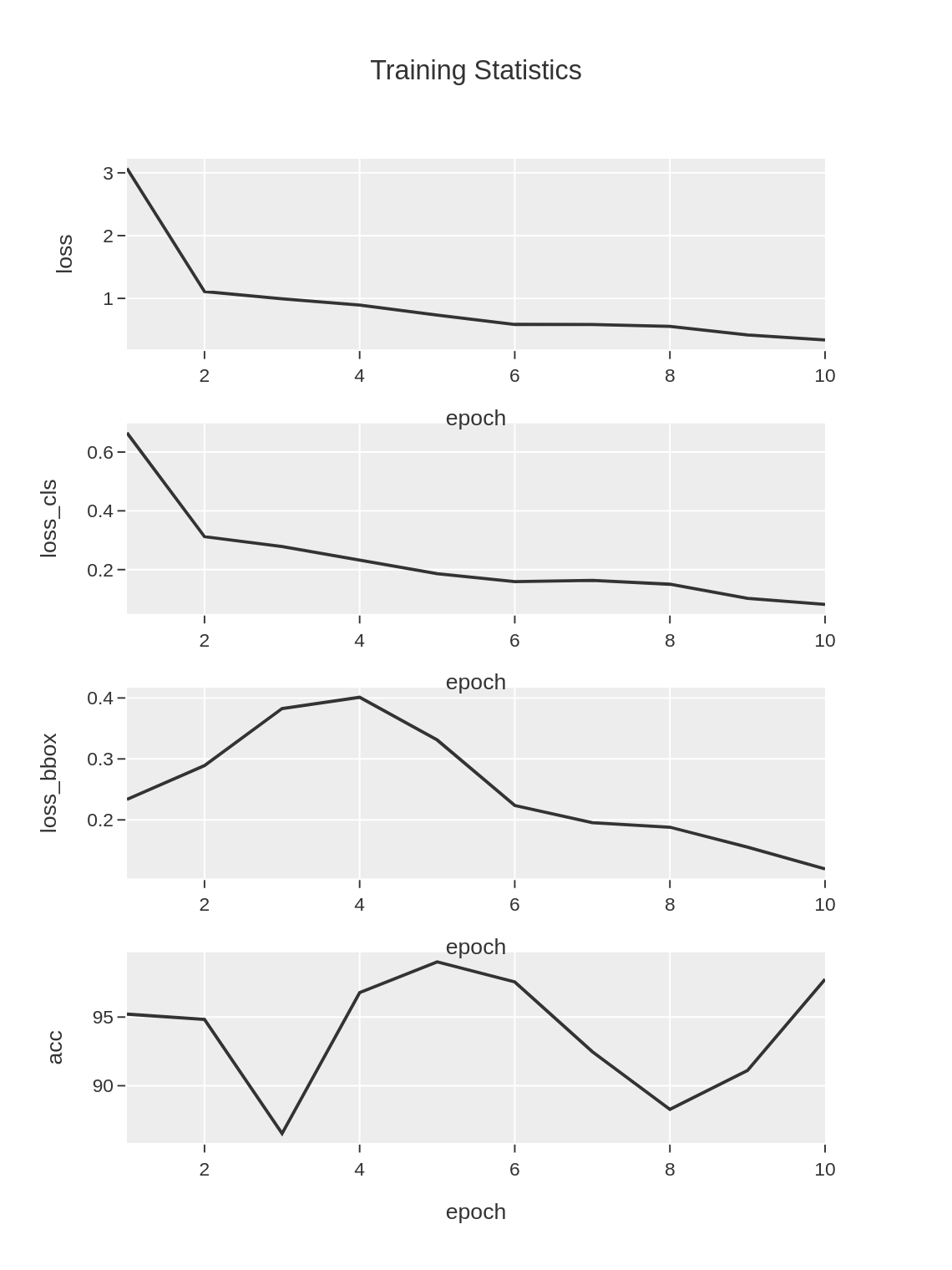
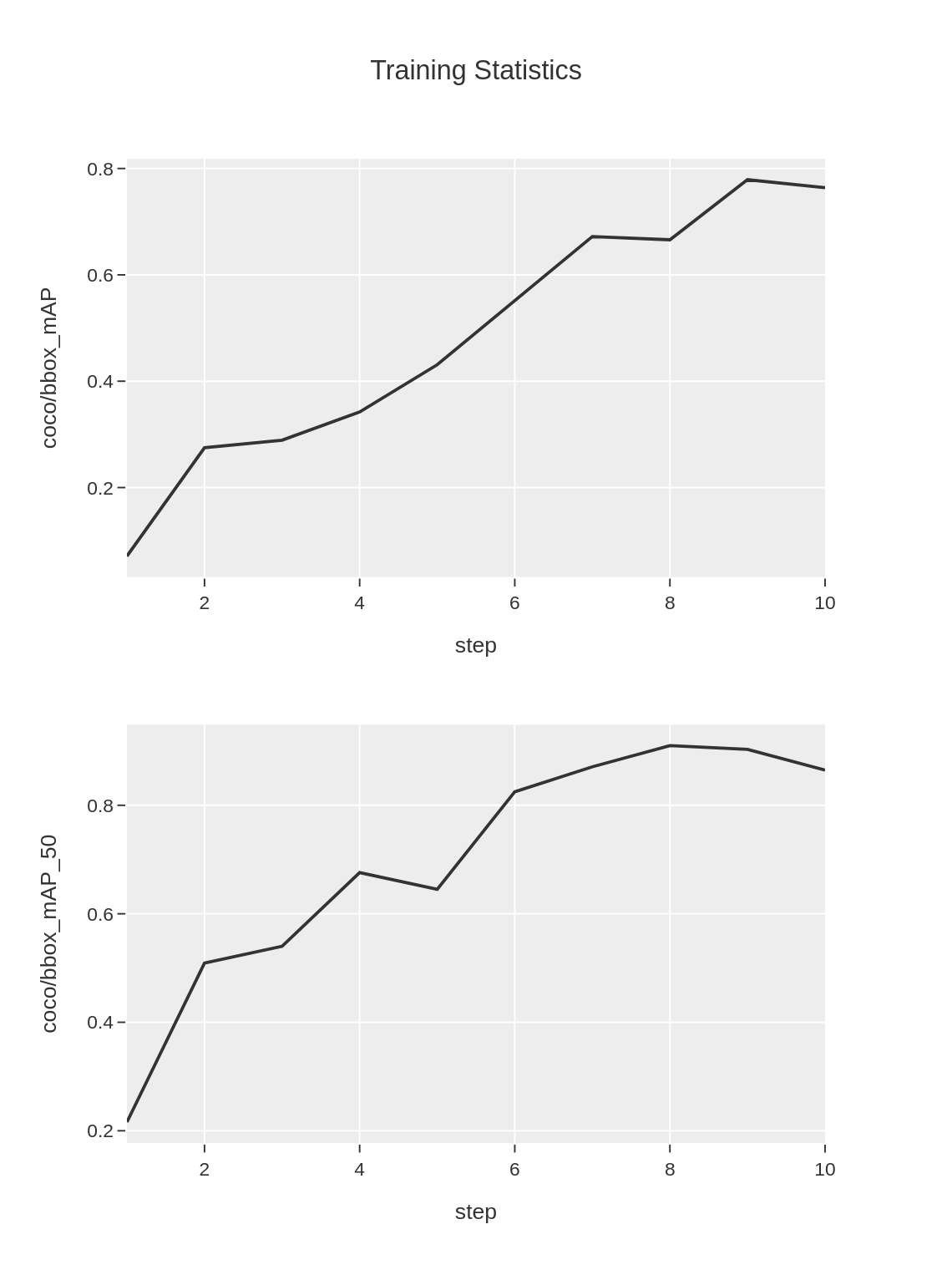
and the loss and accuracy data during the training process will be saved in
strawberry.train_stats.train.txt and strawberry.train_stats.valid.txt
and the figures based on the two file.
Both files are tab-separated files as follows:
strawberry.train_stats.train.txt
epoch       lr      data_time       loss    loss_rpn_cls    loss_rpn_bbox   loss_cls        acc     loss_bbox       loss_mask       time    memory
1   0.00118 0.03453 1.84487 0.03162 0.01490 0.59783 88.37890625     0.3763710225621859      0.8241304568946362      0.4096731980641683      5721.0
2   0.00238 0.01690 1.01754 0.01787 0.01174 0.31824 83.984375       0.4193130740523338      0.250374620705843       0.36697773933410643     5686.0
3   0.00353 0.01563 0.72365 0.00546 0.01157 0.21473 87.59765625     0.3275810395181179      0.1643025816977024      0.35318960666656496     5757.0
4   0.00478 0.01308 0.51533 0.00525 0.01162 0.15927 98.33984375     0.194721964225173       0.14444936953485013     0.37441123962402345     5804.0
5   0.00598 0.01276 0.44866 0.00665 0.01034 0.12237 95.3125 0.17035995483398436     0.13892668940126895     0.36310056209564207     5728.0
strawberry.train_stats.train.png
strawberry.train_stats.valid.txt
coco/bbox_mAP       coco/bbox_mAP_50        coco/bbox_mAP_75        coco/bbox_mAP_s coco/bbox_mAP_m coco/bbox_mAP_l coco/segm_mAP   coco/segm_mAP_50        coco/segm_mAP_75        coco/segm_mAP_s coco/segm_mAP_m coco/segm_mAP_l data_time       time    step
0.345       0.507   0.399   -1.0    -1.0    0.345   0.412   0.507   0.466   -1.0    -1.0    0.413   0.1388627529144287      0.86514892578125        1
0.352       0.614   0.345   -1.0    -1.0    0.352   0.5     0.614   0.581   -1.0    -1.0    0.501   0.012227217356363932    0.40663444995880127     2
0.579       0.748   0.693   -1.0    -1.0    0.582   0.643   0.748   0.748   -1.0    -1.0    0.659   0.01785115400950114     0.23407896359761557     3
0.642       0.785   0.785   -1.0    -1.0    0.642   0.72    0.785   0.785   -1.0    -1.0    0.75    0.018213987350463867    0.2121752897898356      4
0.643       0.829   0.829   -1.0    -1.0    0.643   0.718   0.829   0.829   -1.0    -1.0    0.725   0.01665182908376058     0.18859827518463135     5
strawberry.train_stats.valid.png
Additionally, if the test data is provided,
the model will be evaluated using the test data.
The inference results of test data are stored in workspace (strawberry directory)
with the name test_outputs.coco.json in COOC format file.
The test performance metrics (e.g., mAP) will be saved in strawberry.test_stats.json
in JSON format as follows.
The stats element indicates the mean of metrics of all classes,
while the metrics for each class are stored in class_stats elements.
{
    "stats": {
        "AP@[0.50:0.95|all|100]": 0.8671538582429673,
        "AP@[0.50|all|1000]": 0.9365079365079365,
        "AP@[0.75|all|1000]": 0.9365079365079365,
        ...
        "AP@[0.50:0.95|large|1000]": 0.8671538582429673,
        "AR@[0.50:0.95|all|100]": 0.4738095238095238,
        "AR@[0.50:0.95|all|300]": 0.9029761904761905,
    },
    "class_stats": {
        "flower": {
            "AP@[0.50:0.95|all|100]": 0.9252475247524753,
            "AP@[0.50|all|1000]": 1.0,
            "AP@[0.75|all|1000]": 1.0,
            ...
        },
        "green_fruit": {
            "AP@[0.50:0.95|all|100]": 0.9665016501650165,
            "AP@[0.50|all|1000]": 1.0,
            "AP@[0.75|all|1000]": 1.0,
            ...
        },
        "red_fruit": {
            "AP@[0.50:0.95|all|100]": 0.7097123998114098,
            "AP@[0.50|all|1000]": 0.8095238095238095,
            "AP@[0.75|all|1000]": 0.8095238095238095,
            ...
        }
    }
}
Inference
To perform inference using the constructed model,
refer to the inference function in the source code.
Alternatively, it can also be executed directly from the command line as follows:
python segm.py inference \
    --label ./data/fruits/label.txt \
    --data ./data/fruits/test.txt \
    --model_weights ./outputs/strawberry.pth \
    --output ./outputs/inference_results
The inference result of each image
(i.e., image with predicted bounding boxes)
will be saved in inference_results directory.
Additionanly, a COCO format file containing all predicted annotations
will be saved in instances.json
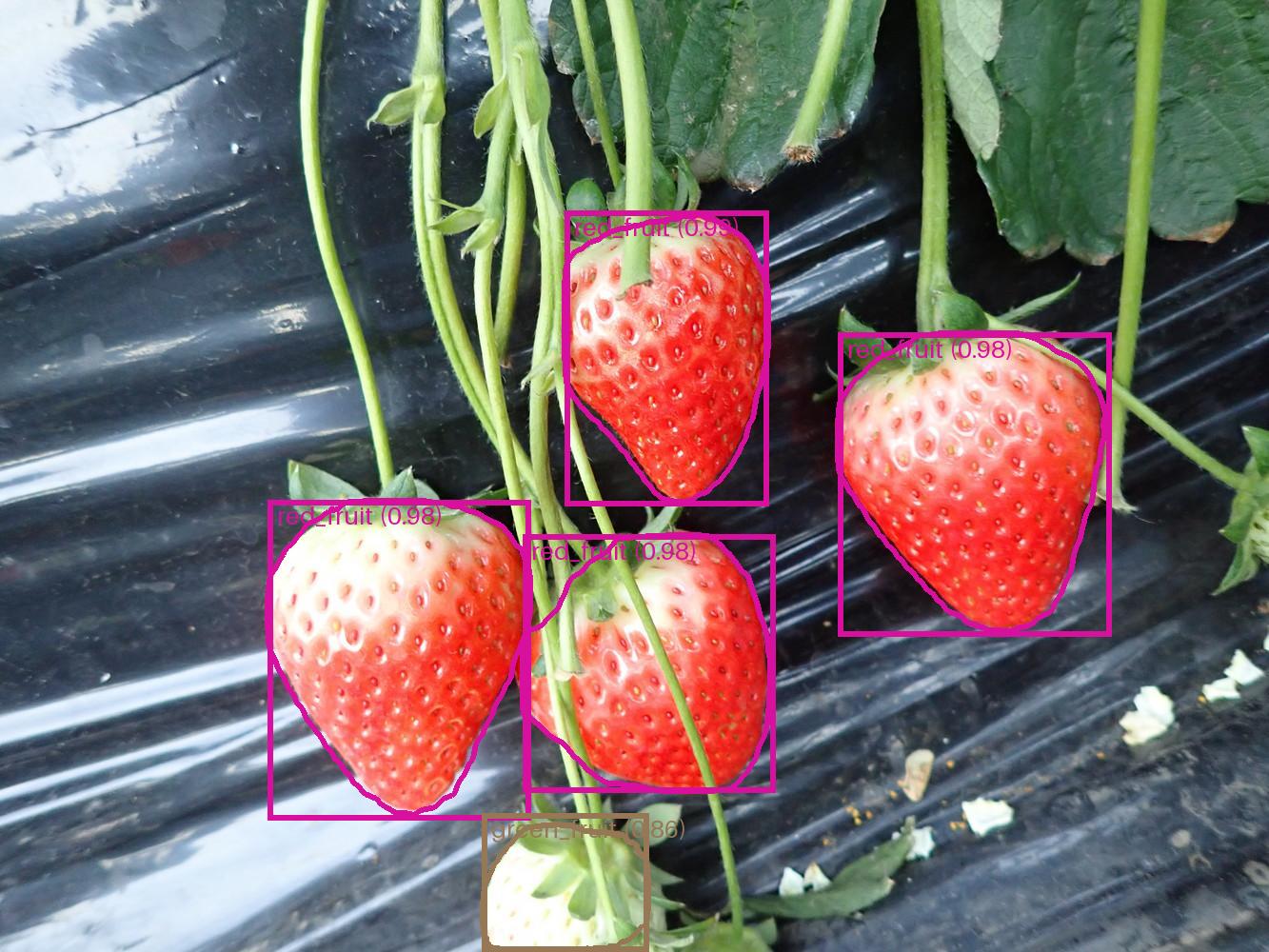
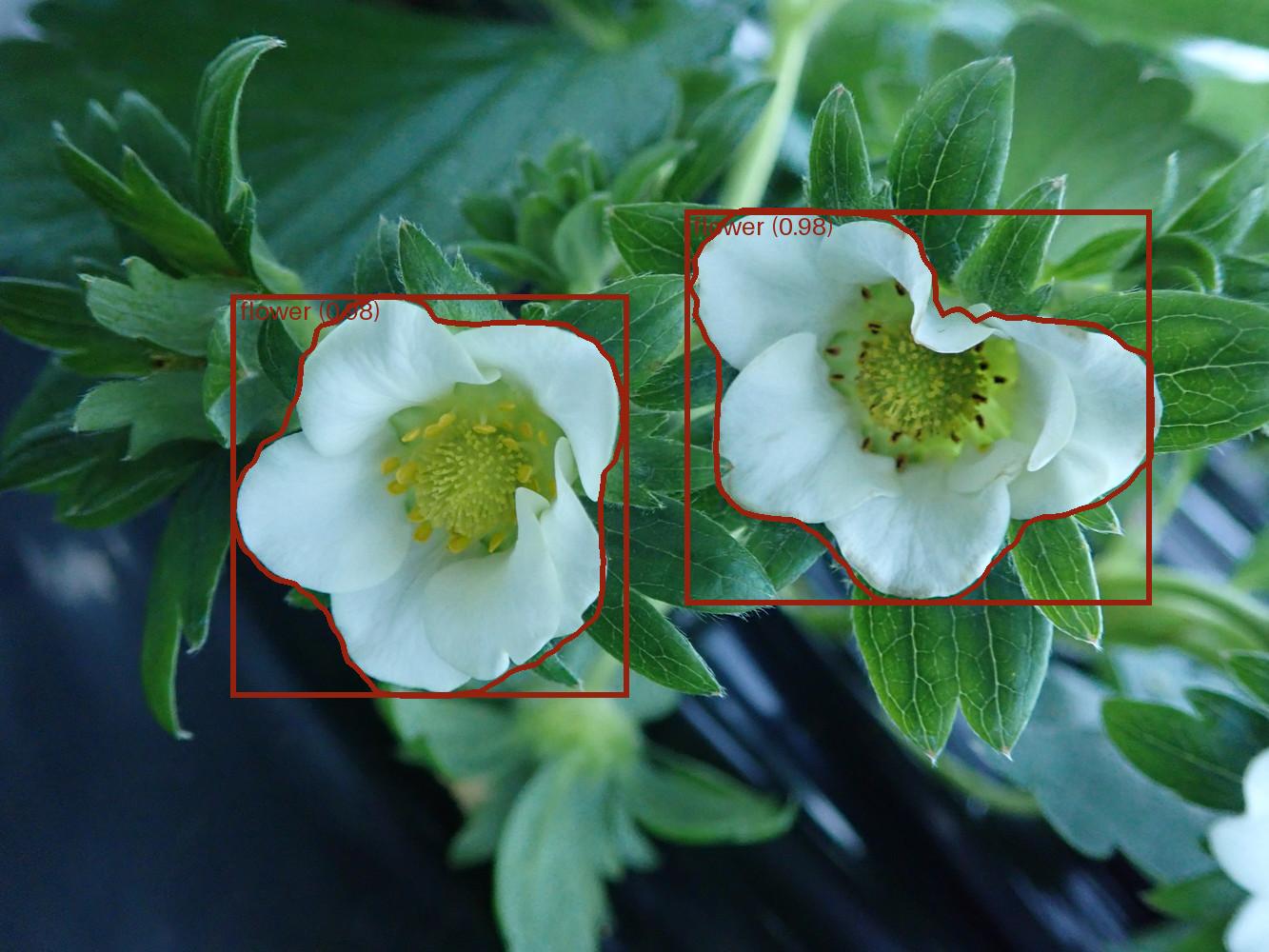
Example of outputed images are: